Box Computers BX Series |
BX-U310
|
1 |
- |
- |
1 port
3840×2160 |
- |
- |
|
BX-U200
BX-U200R
|
3
(Expansion/Clone) |
1 port (v1.2)
Dual Mode
3840×2160 |
1 port (v1.2)
Dual Mode
3840×2160 |
- |
- |
- |
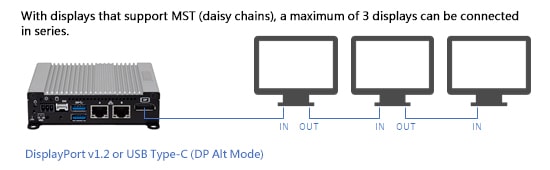
A maximum of 3 displays can be connected. Because DisplayPort and USB Type-C (DP Alt Mode) support Dual Mode, it is possible to connect HDMI or DVI input displays using a passive type adapter or converter cable.
 Click to enlarge
 Click to enlarge
|
BX-C210-G
BX-C211-G
BX-C212-G
|
3
(Expansion/Clone) |
1port(v1.2)
Dual Mode
3840×2160 |
- |
- |
- |
- |
A maximum of 3 displays can be connected.
Because DisplayPort supports Dual Mode, it is possible to connect HDMI or DVI input displays using a passive type adapter or converter cable. |
|
CPS-BXC200
|
3
(Expansion/Clone) |
1 port (v1.2)
Dual Mode
3840×2160 |
- |
- |
- |
1 port
1920×1200 |
A maximum of 3 displays can be connected. The number of displays that can be connected to Analog RGB is 1.
Because DisplayPort supports Dual Mode, it is possible to connect HDMI or DVI input displays using a passive type adapter or converter cable.
|
| BX-T310-G |
3 |
1 port
4096×2304@60Hz |
- |
- |
- |
1 port
1920×1200@60Hz |
|
BX-T210
BX-T210R
|
3
(Expansion/Clone) |
1 port (v1.2)
Dual Mode
3840×2160 |
- |
- |
- |
1 port
1920×1200 |
A maximum of 3 displays can be connected. The number of displays that can be connected to Analog RGB is 1.
Because DisplayPort supports Dual Mode, it is possible to connect HDMI or DVI input displays using a passive type adapter or converter cable. |
|
BX-T5000-G
|
3
(Expansion/Clone) |
1 port (v1.4)
Dual Mode
4096×2160@60Hz |
- |
1 port (v1.4)
3840×2160@30Hz |
- |
- |
A maximum of 3 displays can be connected.
Because DisplayPort supports Dual Mode, it is possible to connect HDMI or DVI input displays using a passive type adapter or converter cable. |
|
BX-T3020
|
3
(Expansion/Clone) |
1 port (v1.4)
Dual Mode
3840×2160 |
- |
1 port (v1.4)
3840×2160 |
- |
- |
A maximum of 3 displays can be connected.
Because DisplayPort supports Dual Mode, it is possible to connect HDMI or DVI input displays using a passive type adapter or converter cable. |
BX-T3000
BX-T3000R
|
3
(Expansion/Clone) |
1 port (v1.2)
Dual Mode
3840×2160 |
- |
- |
- |
1 port
1920×1200 |
A maximum of 3 displays can be connected. The number of displays that can be connected to Analog RGB is 1.
Because DisplayPort supports Dual Mode, it is possible to connect HDMI or DVI input displays using a passive type adapter or converter cable. |
BX-T1000
BX-T1010
BX-T1020
|
3
(Expansion/Clone) |
1 port (v1.2)
Dual Mode
3840×2160 |
- |
- |
1 port
(DVI-D)
1920×1200 |
- |
A maximum of 3 displays can be connected. The number of displays that can be connected to DVI is 1.
Because DisplayPort supports Dual Mode, it is possible to connect HDMI or DVI input displays using a passive type adapter or converter cable.
|
BX-S2000T
|
3
(Expansion/Clone) |
1 port |
- |
1 port |
- |
- |
|
|
BX-M540
|
3
(Expansion/Clone) |
- |
1 port USB 3.2 Gen2
Type-C [DP Alt Mode]
3840×2160 |
1 port (2.0)
3840×2160 |
- |
- |
A maximum of 3 displays can be connected.
Because DisplayPort and USB Type-C (DP Alt Mode) support Dual Mode, it is possible to connect HDMI or DVI input displays using a passive type adapter or converter cable.
|
BX-M4600
-M4600P2
-M4600P2A
|
3
(Expansion/Clone) |
1 port (1.4)
Dual Mode
4096×2160@60Hz |
- |
- |
1 port
(DVI-I)
1920×1200@30Hz(DVI-D&VGA) |
- |
A maximum of 3 displays can be connected.
Because DisplayPort supports Dual Mode, it is possible to connect HDMI or DVI input displays using a passive type adapter or converter cable.
|
|
BX-M310
|
3
(Expansion/Clone) |
1 port
Dual Mode
4096×2160 |
- |
- |
- |
1 port*
1920×1200 |
A maximum of 3 displays can be connected.
Because DisplayPort supports Dual Mode, it is possible to connect HDMI or DVI input displays using a passive type adapter or converter cable.
|
|
BX-M3010
|
3
(Expansion/Clone) |
1 port
Dual Mode
4096×2304@60Hz |
- |
1 port
4096×2160@30Hz |
- |
- |
A maximum of 3 displays can be connected.
Because DisplayPort supports Dual Mode, it is possible to connect HDMI or DVI input displays using a passive type adapter or converter cable.
|
|
BX-M210
|
3
(Expansion/Clone) |
1 port (v1.2)
Dual Mode
3840×2160 |
- |
- |
- |
1 port
1920×1200 |
A maximum of 3 displays can be connected. The number of displays that can be connected to Analog RGB is 1.
Because DisplayPort supports Dual Mode, it is possible to connect HDMI or DVI input displays using a passive type adapter or converter cable. |
BX-M2500
BX-M2510
|
3
(Expansion/Clone) |
1 port (v1.2)
Dual Mode
3840×2160 |
- |
- |
1 port
(DVI-I)
1920×1200 |
1 port*
1920×1080 |
A maximum of 3 displays can be connected. The number of DVI and Analog RGB displays that can be connected is 1.
Because DisplayPort supports Dual Mode, it is possible to connect HDMI or DVI input displays using a passive type adapter or converter cable.
|
BX-S3300
BX-S3300P2
|
3
(Expansion/Clone) |
1 port (v1.2)
Dual Mode
3840×2160 |
- |
- |
1 port
(DVI-I)
1920×1200 |
1 port*
1920×1080 |
A maximum of 3 displays can be connected. The number of DVI and Analog RGB displays that can be connected is 1.
Because DisplayPort supports Dual Mode, it is possible to connect HDMI or DVI input displays using a passive type adapter or converter cable.
|
BX-S3000
Discontinued
-S3000P2
Discontinued
-S3000P2A
Discontinued
|
3
(Expansion/Clone) |
1 port (v1.2)
Dual Mode
3840×2160 |
- |
- |
1 port
(DVI-I)
1920×1200 |
1 port*
1920×1080 |
BX-M1020
BX-M1020P2
BX-M1020P4
|
3
(Expansion/Clone) |
1 port (v1.2)
Dual Mode
3840×2160 |
- |
- |
1 port
(DVI-D)
1920×1200 |
- |
A maximum of 3 displays can be connected. The number of displays that can be connected to DVI is 1.
Because DisplayPort supports Dual Mode, it is possible to connect HDMI or DVI input displays using a passive type adapter or converter cable.
|
BX-M1010
BX-M1010P2
BX-M1010P4
|
3
(Expansion/Clone) |
1 port (v1.2)
Dual Mode
3840×2160 |
- |
- |
1 port
(DVI-D)
1920×1200 |
- |
|
BX-830 Discontinued
|
2
(Expansion/Clone) |
1 port (v1.1a)
1920×1200 |
- |
- |
1 port
(DVI-I)
1920×1080 |
1 port*
1920×1200 |
1 display can be connected to DisplayPort and 1 display can be connected to DVI.
|
|
BX-825 Discontinued
|
2
(Expansion/Clone) |
1 port (v1.1a)
1920×1200 |
- |
- |
1 port
(DVI-I)
1920×1080 |
1 port*
1920×1200 |
|
BX-220 Discontinued
|
2
(Expansion/Clone) |
1 port (v1.1a)
1920×1200 |
- |
- |
1 port
(DVI-I)
1920×1080 |
1 port*
1920×1200 |
|
BX-R100 Discontinued
|
1 |
1 port (v1.1a)
1920×1200 |
- |
- |
- |
- |
|
| BX-956S Discontinued |
1 |
- |
- |
- |
1 port
(DVI-I)
1920×1080 |
1 port*
1920×1200 |
|
|
BX-321 Discontinued
|
1 |
- |
- |
- |
- |
1 port
1920×1200 |
|
|
BX-320 Discontinued
|
1 |
- |
- |
- |
- |
1 port
1920×1200 |
|
Box Computers EPC Series |
EPC-5000A
EPC-5000B
|
3
(Expansion/Clone) |
1 port (v1.4)
Dual Mode
4096×2160@60Hz |
- |
1 port
4096×2160@60Hz |
- |
1920×1080@60Hz |
A maximum of 3 displays can be connected.
Because DisplayPort supports Dual Mode, it is possible to connect HDMI or DVI input displays using a passive type adapter or converter cable.
|
EPC-4000
EPC-4000P2
EPC-4000P4
|
2
(Expansion/Clone) |
1 port (v1.2)
Dual Mode
3840×2160 |
- |
- |
1 port (DVI-D)
1920×1200 |
- |
A maximum of 3 displays can be connected.
Because DisplayPort supports Dual Mode, it is possible to connect HDMI or DVI input displays using a passive type adapter or converter cable.
|
EPC-3010
Discontinued
-3010(2 slots)
Discontinued
-3010(4 slots)
Discontinued
|
3
(Expansion/Clone) |
1 port (v1.2)
Dual Mode
3840×2160 |
- |
1 port (v1.4)
3840×2160@24Hz |
1 port (DVI-I)
1920×1080 |
1 port*
1920×1080 |
A maximum of 3 displays can be connected.
Because DisplayPort supports Dual Mode, it is possible to connect HDMI or DVI input displays using a passive type adapter or converter cable.
|
Edge AI Computers |
|
DX-M2300
|
1 |
- |
- |
1 port (v2.0)
3840×2160@60Hz |
- |
- |
|
DX-U2200
DX-U2100
|
1 |
- |
- |
1 port (v1.4)
3840×2160@60Hz |
- |
- |
|
DX-U1210
DX-U1200
DX-U1200P1
|
2
(Expansion/Clone) |
1 port (v1.4)
3840×2160 |
- |
1 port (v2.0)
3840×2160@60Hz |
- |
- |
|
DX-U1100
DX-U1100P1
|
2
(Expansion/Clone) |
1 port
(eDP v1.4)
3840×2160 |
- |
1 port (v2.0)
3840×2160@60Hz |
- |
- |
|
Digital Signage Player DS |
| DS-220 Discontinued |
1 |
1 port
(v1.1a)
1920×1200 |
- |
- |
1 port (DVI-I)
1920×1080 |
- |
|
FA Computer VPC |
|
VPC-7000 |
1 |
- |
- |
- |
- |
1 port
1920×1200 |
|
|
VPC-5000
|
3
(Expansion/Clone) |
1 port (v1.2)
Dual Mode
3840×2160 |
- |
1 port(v1.4)
3840×2160@30Hz |
- |
1 port
1920×1080 |
A maximum of 3 displays can be connected.
Because DisplayPort supports Dual Mode, it is possible to connect HDMI or DVI input displays using a passive type adapter or converter cable.
|
| VPC-3200 |
3
(Expansion/Clone) |
1 port
Dual Mode
4096×2160@60Hz |
- |
1 port
4096×2160@60Hz |
1 port (DVI-I)
1920×1200@60Hz |
1 port*
1920×1200 |
A maximum of 3 displays can be connected.
Because DisplayPort supports Dual Mode, it is possible to connect HDMI or DVI input displays using a passive type adapter or converter cable.
|
| VPC-3100 |
3
(Expansion/Clone) |
1 port (v1.2)
Dual Mode
3840×2160 |
- |
1 port(v1.4)
3840×2160@30Hz |
1 port (DVI-I)
1920×1200 |
1 port*
1920×1200 |
|
VPC-1800
|
3
(Expansion/Clone) |
1 port
Dual Mode
4096×2160@60Hz |
- |
1 port
4096×2160@60Hz |
1 port (DVI-I)
1920×1200 |
1 port*
1920×1200 |
|
VPC-1700
|
3
(Expansion/Clone) |
1 port (v1.2)
Dual Mode
3840×2160 |
- |
1 port(v1.4)
3840×2160@30Hz |
1 port (DVI-I)
1920×1200 |
1 port*
1920×1200 |
|
VPC-720
|
3
(Expansion/Clone) |
2 port
Dual Mode
3840×2160 |
- |
1 port
3840×2160@24Hz |
- |
- |
A maximum of 3 displays can be connected.
Because DisplayPort supports Dual Mode, it is possible to connect HDMI or DVI input displays using a passive type adapter or converter cable.
|
VPC-700
Discontinued
|
3
(Expansion/Clone) |
1 port (v1.2)
Dual Mode
3840×2160 |
- |
1 port(v1.4)
3840×2160@24Hz |
1 port (DVI-I)
1920×1200 |
- |
|
Custom Computer LPC |
|
LPC-1800
|
3
(Expansion/Clone) |
1 port
3840×2160@60Hz |
- |
1 port
4096×2160@60Hz |
1 port (DVI-I)
1920×1200@60Hz |
- |
A maximum of 3 displays can be connected.
Because DisplayPort supports Dual Mode, it is possible to connect HDMI or DVI input displays using a passive type adapter or converter cable.
|
|
LPC-1700
|
3
(Expansion/Clone) |
1 port
3840×2160@60Hz |
- |
1 port
3840×2160@60Hz |
1 port (DVI-I)
1920×1080@60Hz |
1 port※
1920×1200 |
A maximum of 3 displays can be connected.
Because DisplayPort supports Dual Mode, it is possible to connect HDMI or DVI input displays using a passive type adapter or converter cable.
|
LPC-200A
Discontinued
|
2
(Expansion/Clone) |
1 port (v1.2)
1920×1200 |
- |
1 port (v1.4)
1920×1080@60Hz |
- |
- |
A maximum of 2 displays can be connected.
Because DisplayPort supports Dual Mode, it is possible to connect HDMI or DVI input displays using a passive type adapter or converter cable.
|
Custom Computer Solution-ePC |
|
MR44000
|
1 |
- |
- |
- |
- |
1 port |
|
|
MR4310
|
2
(Expansion/Clone) |
- |
- |
1 port
4096×2160 |
1 port (DVI-I)
1920×1080 |
- |
|
|
MR4300
|
3
(Expansion/Clone) |
1 port
7680×4320@60Hz |
- |
1 port
3840×2160@60Hz |
- |
1 port
1920×1200@60Hz |
|
|
MR4100
|
3
(Expansion/Clone) |
1 port
3840×2160 |
- |
1 port
3840×2160 |
- |
1 port
1920×1080 |
|
SR4100
SR4110
SR4120
|
2
(Expansion/Clone) |
- |
- |
- |
1 port (DVI-I)
1920×1200 |
1 port*
1920×1080 |
|
|
SR4000
|
2
(Expansion/Clone) |
- |
- |
- |
1 port (DVI-I)
1920×1200 |
1 port*
1920×1200 |
|
SPF14MQ1700 Discontinued
|
3
(Expansion/Clone) |
- |
- |
1 port(v1.4)
3840×2160@24Hz |
1 port (DVI-D)
1920×1200 |
1 port
1920×1200 |
A maximum of 3 displays can be connected.
|
|
SPF14SQ1700 Discontinued
|
2
(Expansion/Clone) |
- |
- |
- |
1 port (DVI-D)
1920×1200 |
1 port*
1920×1080 |
|
|
SPF10SQ1700 Discontinued
|
2
(Expansion/Clone) |
- |
- |
- |
1 port (DVI-D)
1920×1200 |
1 port*
1920×1080 |
|
SPF6SQ1700 Discontinued
|
2
(Expansion/Clone) |
- |
- |
- |
1 port (DVI-D)
1920×1200 |
1 port*
1920×1080 |